
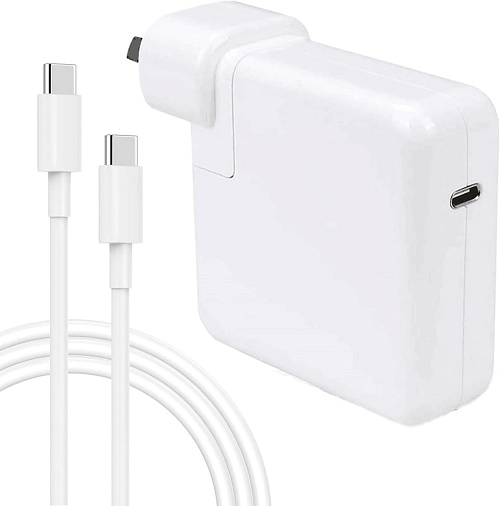
Choosing the right power adapter can make a noticeable difference in how quickly your MacBook charges and how well it performs under load. Before diving into the details of 61W versus 96W adapters, take a moment to explore the handy charger‑selection guide on the Campad Electronics website. Campad Electronics have expertise, ahve quality products and great service. That resource walks you through the specific requirements for every MacBook model, whether you’re using a MacBook Pro or a MacBook Air, so you can pick the optimal adapter and cable combination right from the start.
Overview of Power Adapter Options
Apple offers three USB‑C power adapter options for MacBooks. The 61W adapter is intended for the 13‑inch MacBook Pro under light to moderate workloads, delivering standard charging with no fast‑charge mode on larger models. The 96W adapter supports the 14‑inch MacBook Pro with M1 Pro/Max, the 15‑inch MacBook Air and occasionally the 13‑inch model; it enables Apple’s fast charge, reaching approximately 50% in about 30 minutes on supported models.
The 140W adapter is designed for the 16‑inch MacBook Pro with M1 Pro/Max and newer M4 models, providing fast charge that reaches roughly 50% in 30 minutes. Because Apple’s power management draws only the power the laptop requires, a higher‑wattage adapter will never damage a lower‑wattage‑rated MacBook.
| Adapter | Typical Use | Maximum Output | Fast‑Charge Capability |
|---|---|---|---|
| 61W USB‑C Power Adapter | 13‑inch MacBook Pro, light‑to‑moderate workloads | 61W | Standard charging; no “fast‑charge” mode on larger models |
| 96 W USB‑C Power Adapter | 14‑inch MacBook Pro (M1‑Pro/Max), 15‑inch MacBook Air, occasional 13‑inch use | 96W | Enables Apple’s fast‑charge (≈50% in ~30 min) on supported models |
| 140W USB‑C Power Adapter | 16‑inch MacBook Pro (M1‑Pro/Max) and newer M4 models | 140W | Fast‑charge for 16‑inch models (≈50% in 30 min) |
Apple’s power management draws only the power the laptop requires, so a higher‑wattage adapter will never damage a lower‑wattage‑rated MacBook.
Charging Speed Comparison
Charging speed varies significantly across MacBook Pro models and power adapters. For the 13-inch MacBook Pro, both the 61W and 96W chargers deliver similar performance, reaching 50% in 45–55 minutes and 100% in 2–2.5 hours, as the laptop limits its draw to 61W. The 14-inch MacBook Pro charges more slowly with a 61W adapter, taking 70–80 minutes to 50% and 3–3.5 hours to 100% and may not keep up under heavy load; however, with a 96W adapter, it activates fast charging, reaching 50% in about 30 minutes and 100% in roughly 1.5 hours.
The 16-inch MacBook Pro charges slowly with a 96W adapter, taking over an hour to 50% and more than three hours to 100%, as 96W is insufficient for fast charging. With the recommended 140W adapter, it achieves fast charging, reaching 50% in about 30 minutes and 100% in roughly 1.5 hours. Exact times vary with battery health, ambient temperature and workload.
| Scenario | Approx. Time to 50% | Approx. Time to 100% | Notes |
|---|---|---|---|
| 13‑inch MacBook Pro + 61W | 45–55 min | 2–2.5 h | Standard charging; no fast‑charge mode |
| 13‑inch MacBook Pro + 96W | 45–55 min (no noticeable gain) | 2–2.5h | Laptop limits draw to 61W |
| 14‑inch MacBook Pro + 61W | 70–80 min | 3–3.5 h | Slower; may not keep up under heavy load |
| 14‑inch MacBook Pro + 96W | ~30 min to 50% | ~1.5h to 100% | Fast‑charge mode activated |
| 16‑inch MacBook Pro + 96W | 1h + to 50% (slow) | >3 h | 96W insufficient for fast‑charge; use 140W |
| 16‑inch MacBook Pro + 140W | ~30 min to 50% | ~1.5h to 100% | Recommended for full‑speed charging |
Exact times vary with battery health, ambient temperature and workload.
Which Adapter Is Right for Your Model?
For the 13-inch MacBook Pro (M1/M2), the included 61W adapter provides optimal speed, and while a 96W or higher adapter works, it will not improve charging speed. The 14-inch MacBook Pro (2021/2023, M1 Pro/Max) requires at least 96W for fast charging, Apple’s 96W USB‑C Power Adapter or a higher wattage like 140W yields the same result. With the 15-inch MacBook Air charges adequately at 61W, but fast charging is enabled with a 96W adapter. The 16-inch MacBook Pro (2021/2023, M1 Pro/Max) needs 140W for fast charging; using a 96W adapter will charge the device, but significantly slower.
- 13‑inch MacBook Pro (M1/M2): 61W is the Apple‑included adapter and provides optimal speed. A 96 W adapter works, but charging speed will not improve.
- 14‑inch MacBook Pro (2021‑2023, M1‑Pro/Max): 96W is the minimum for fast‑charging. Use Apple’s 96W USB‑C Power Adapter or a higher‑wattage (140W) adapter for the same result.
- 15‑inch MacBook Air: 61W works, but 96W enables fast‑charge.
- 16‑inch MacBook Pro (2021‑2023, M1‑Pro/Max): Requires 140W for fast‑charging; 96W will charge, but significantly slower.
Cable Requirements
The charging speed is determined by the cable’s power rating, regardless of the adapter’s wattage. The included USB C to MagSafe 3 cable supports up to 96W or 140W on newer models. A 1 metre USB C charge cable is rated for 60W and cannot handle 96W fast charging. A 2 metre USB C charge cable supports up to 100W and is suitable for 96W fast charging on 14-inch models. A 240W USB C charge cable is required for 140W adapters to enable fast charging on 16-inch models from November 2023 or later. Using a cable with a lower power rating will throttle the charging speed.
- USB‑C to MagSafe 3 Cable (included): Supports up to 96W (or 140W on newer models).
- USB‑C Charge Cable (1m): Rated for 60W; not suitable for 96 W fast‑charge.
- USB‑C Charge Cable (2m): Rated for up to 100W; can handle 96 W fast‑charge on 14‑inch models.
- 240W USB‑C Charge Cable: Compatible with 140W adapters for 16‑inch fast‑charge (Nov 2023 or later).
Using a cable with a lower power rating will throttle the charging speed regardless of adapter wattage.
Safety and Compatibility
When it comes to safety and compatibility, higher wattage adapters are safe because the MacBook’s PD controller negotiates the appropriate power level. However, you should not go below Apple’s recommended wattage, using a 45W adapter on a 13 inch Pro will charge slowly and may not sustain power under heavy use, leading to battery drain. Non Apple chargers are acceptable if they are USB C PD compliant, reputable and meet or exceed the required wattage.
- Higher‑wattage adapters are safe: The MacBook’s PD controller negotiates the appropriate power level.
- Do not go below Apple’s recommended wattage: Using a 45W adapter on a 13‑inch Pro will charge slowly and may not sustain power under heavy use, leading to battery drain.
- Non‑Apple chargers: Acceptable if they are USB‑C PD‑compliant, reputable and meet or exceed the required wattage.
Bottom Line
Select the adapter that matches your MacBook Pro’s model and your need for rapid top‑ups. Pair it with a cable rated for the adapter’s wattage and you’ll achieve the fastest, safest charge Apple’s hardware supports. For a hassle‑free decision, consult the Campad Electronics charger‑selection guide. Campad Electronics are Australia’s experts in MacBook power, so you can quickly pick the right charger for any MacBook Pro or Air.
- 61W adapter: Adequate for 13‑inch MacBook Pro and older 15‑inch Air; provides standard charging speed.
- 96W adapter: Essential for 14‑inch MacBook Pro fast‑charging (≈50% in 30 min) and beneficial for 15‑inch Air. Offers no speed gain on 13‑inch models.
- 140W adapter: Required for fast‑charging 16‑inch MacBook Pro; 96W will charge but significantly slower.
Frequently Asked Questions
Can I connect two chargers to speed up charging?
No. The MacBook draws power from only the single source providing the highest wattage. Additional adapters have no effect.
Will a 96 W charger damage a 13‑inch MacBook Pro?
No. The laptop will limit intake to its designed 61W.
Is 61W considered “fast charging”?
Only for models that are designed around that wattage (e.g., 13‑inch Pro). Larger models require 96W or 140W to enter Apple’s fast‑charge mode.
Can I use the 96W adapter to charge an iPhone?
Yes. The iPhone’s internal controller will draw only the required power, typically 20W or less.